
Analyzing customer complaints with the Telkom Generative Model API
From the Trial Console to a Flask web app — complete with three test scenarios.
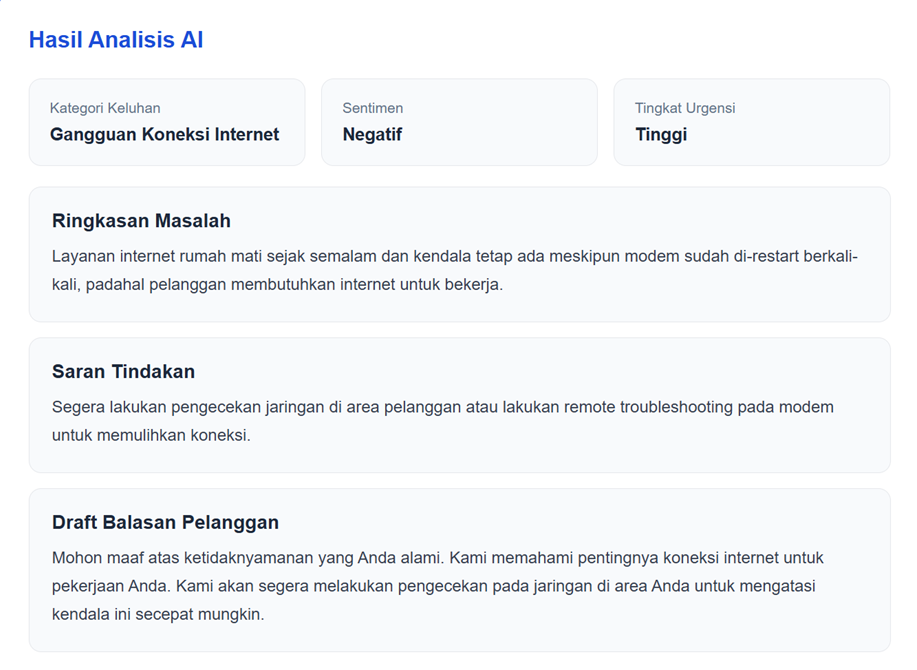
The end result we are going to build: a complaint analyzed into category, sentiment, urgency, summary, recommendation, and a draft reply.
| TL;DR I wanted to try a use case that sits close to customer service work: a complaint comes in as text, and AI helps summarize the problem, determine its category and urgency, and prepare a draft reply. The model is called through the Telkom Generative Model API on APILOGY. |
Starting from a simple problem
A single customer complaint often looks simple because it is only one or two sentences long. But read more carefully, and the agent has to pick up several things at once: what kind of problem this is, how urgent it is, what the customer’s tone is, what the core issue is, and what kind of response should be given.
From there I tried building a small use case called the AI Customer Complaint Assistant. The goal is not to let AI take over customer service, but to give complaints a ‘first pass’ so the important information becomes visible quickly.
The examples I used are fairly realistic: an internet outage, a bill that has been paid but whose status hasn’t changed, and a customer who has contacted customer service twice but still hasn’t received clear information.
What will we build?
The app takes a single input: the customer’s complaint text. Once processed, it displays the following six pieces of information:
- Complaint category.
- Customer sentiment.
- Urgency level.
- Issue summary.
- Recommended action.
- Draft reply to the customer.
| The role of AI here AI is used as an assistant. Its output still needs to be read by a human before it is used for operational decisions or sent to a customer. |
The system flow is not complicated
The final version has a flow like this:
| Customer complaint ↓ Web Form (Flask) ↓ telkom_api.py ↓ POST /v1/chat/completions ↓ Telkom Generative Model API ↓ Response JSON ↓ Category • Sentiment • Urgency Summary • Recommendation • Draft Reply |
Use Case: Analyzing Customer Complaints with AI:
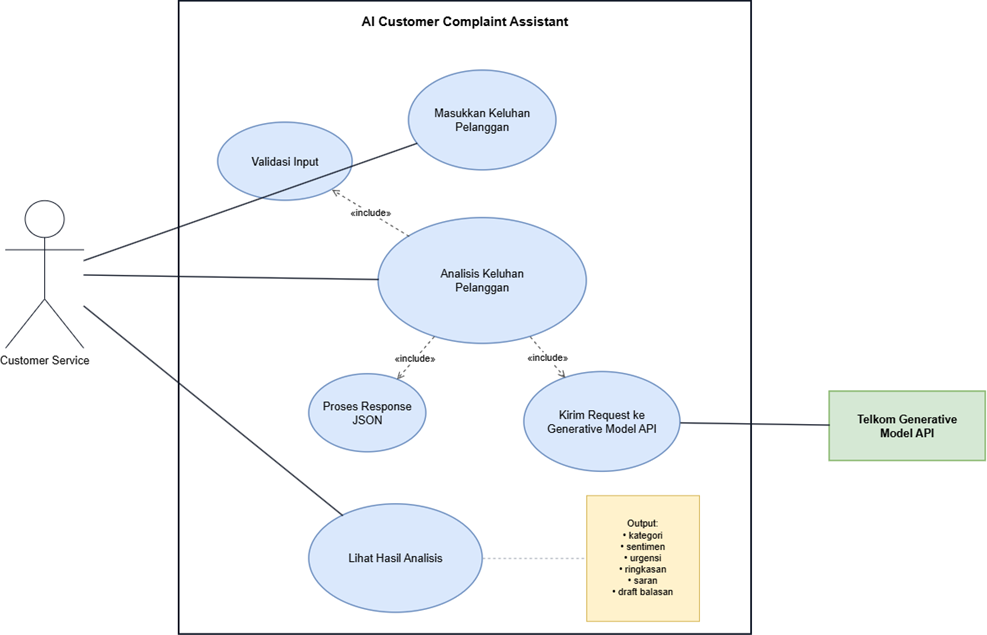
This use case illustrates how the AI Customer Complaint Assistant system receives a customer complaint from the web, sends it to the Telkom Generative Model API, and returns a structured analysis result.
I deliberately started with the Trial Console first. That way, if something goes wrong, we can tell whether the error comes from the API or from the Python code.
1. Use Case Diagram
Actor:
Customer / Customer Service
AI Customer Complaint Assistant:
- Enter Customer Complaint
- Submit Complaint to the System
- Send Request to the Telkom Generative Model API
- Receive Response (JSON)
- Display Analysis Results:
- category
- sentiment
- urgency
- summary
- recommendation
- draft reply
External system:
Telkom Generative Model API
2. Use Case Specification
| Section | Description |
| Use Case Name | Customer Complaint Analysis |
| ID | UC-01 |
| Actor | Customer / Customer Service |
| Description | The system receives a customer complaint, sends it to the Telkom Generative Model API, then displays a structured analysis result. |
| Trigger | The actor submits a complaint through the web form |
| Pre-Condition | The actor has opened the application page. |
| Post-Condition | The complaint analysis result is successfully displayed on the web page. |
| Main Flow | 1. The actor enters the customer complaint in the web form. 2. The system receives the complaint and processes it. 3. The system sends a request to the Telkom Generative Model API via the POST /v1/chat/completions endpoint. 4. The API processes the request and returns a JSON response. 5. The system displays the analysis result to the actor. |
| Alternate Flow | If an error occurs, for example the API fails to respond, the system displays an error message to the actor. |
| Data Managed | • Customer complaint (text input) • Analysis result (JSON): category, sentiment, urgency, summary, recommendation, draft reply |
| Rules / Validation | • The complaint must not be empty. • The API response must be valid JSON. |
| Frequency | Every time a customer submits a complaint. |
3. Brief Explanation
The customer or Customer Service enters the complaint through the web form. The Flask system receives that input and forwards it to the Telkom Generative Model API using this endpoint:
| POST /v1/chat/completions |
The API processes the complaint with the model:
| gemma-4-26B-A4B-it |
and returns the analysis result in JSON format.
The result is then displayed as:
- the complaint category,
- the sentiment,
- the urgency level,
- an issue summary,
- a recommended action,
- and a draft reply to the customer.
4. Benefits of the Use Case
- Speeds up customer complaint analysis through automation.
- Helps Customer Service respond faster and more consistently.
- Reduces the manual workload of classifying complaints and writing initial replies.
1. Setting up the API on APILOGY
| 1 | Open Telkom Generative Model Go to Explore APIs and search for Telkom Generative Model version 0.0.1. |
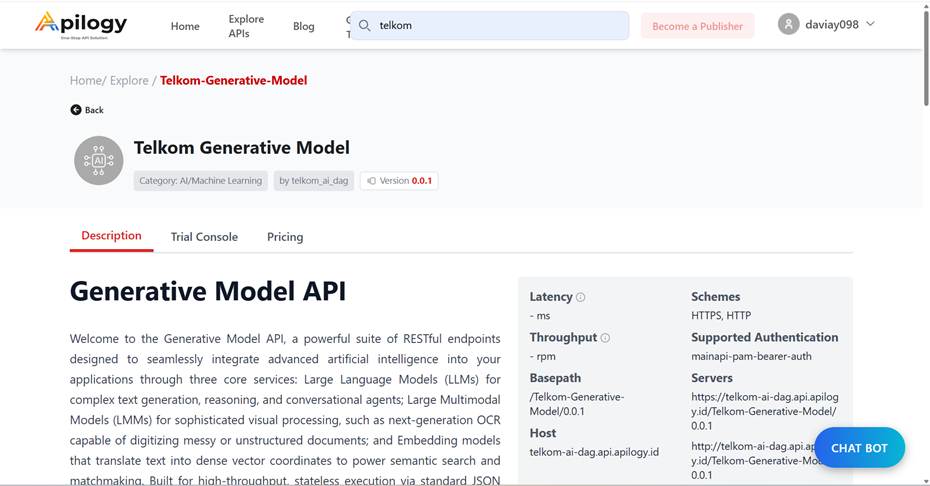
The Telkom Generative Model page on APILOGY.
| 2 | Choose a plan Open the Pricing tab. For this experiment I used the Free Plan. |

The Free Plan used for the experiment.
| 3 | Subscribe to the API Click Subscribe and connect it to the Application you will use. |
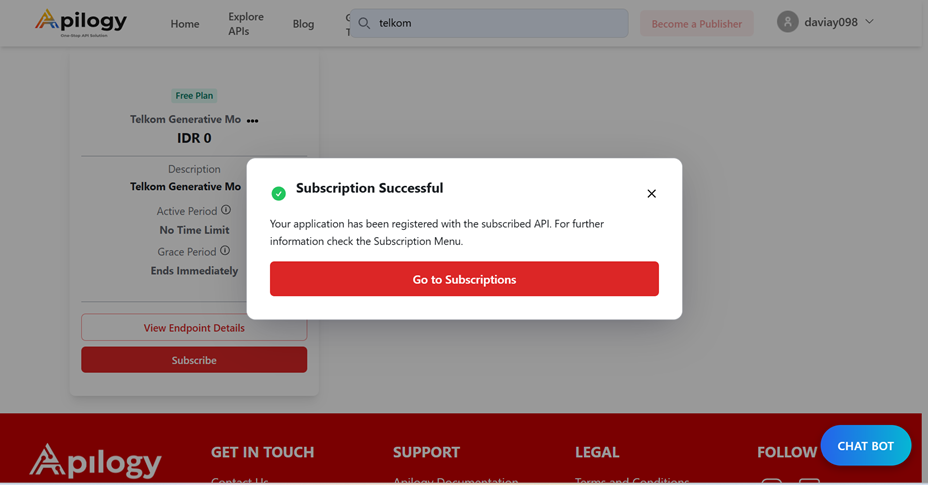
Subscription success notification.
| 4 | Confirm the Bearer token Once the token is ready, open the Trial Console and confirm the token until a message appears saying the API is ready to try. |

Bearer token successfully confirmed.
| Don’t skip this part Never paste your Bearer token into screenshots, blog posts, or GitHub. In the Python project later, the token will be stored in a .env file. |
2. Try it in the Trial Console first
The endpoint used is Chat Completion. In the left panel, open Chat → Create a chat completion. The method used is POST.

The POST /v1/chat/completions endpoint.
The first prompt
I didn’t just write ‘analyze this complaint’. The prompt is specific enough that the model knows the format I want and doesn’t freely add information. (The prompt text below is the exact Indonesian prompt I sent, to match the screenshots.)
| { “model”: “gemma-4-26B-A4B-it”, “messages”: [ { “role”: “user”, “content”: “Anda adalah AI Customer Complaint Assistant. Analisis keluhan tanpa menambahkan informasi yang tidak diberikan. Berikan: 1. Kategori Keluhan, 2. Sentimen, 3. Tingkat Urgensi, 4. Ringkasan Masalah, 5. Saran Tindakan, 6. Draft Balasan. Keluhan: Internet rumah saya sudah mati dari tadi malam. Saya sudah restart modem berkali-kali tetapi tetap tidak bisa. Saya membutuhkan internet untuk bekerja.” } ] } |
The request succeeds when Response Hit shows 200 OK. The model’s answer is in choices → message → content.
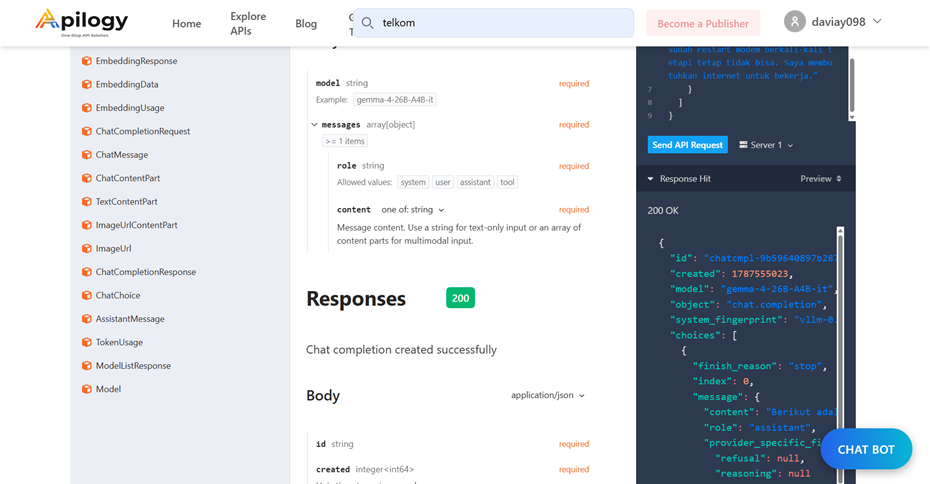
The first request returned 200 OK.
Three initial scenarios
| Scenario | Resulting category | Sentiment | Urgency |
| Internet down | Internet connection outage | Negative | High |
| Payment not yet updated | Payment issue | Negative | Medium |
| Outage + uninformative CS | Internet service disruption | Negative | High |
From here I was confident the use case was worth taking on to Python.
3. Moving from the Trial Console to Python
Next I created a project called telkom-complaint-assistant. I used a virtual environment so the project’s dependencies don’t mix with other Python installations.
| python –version python -m venv venv .\venv\Scripts\Activate.ps1 |
If PowerShell blocks Activate.ps1
On my laptop, activating the venv failed at first because PowerShell refused to run the script.

PowerShell error when activating the virtual environment.
The fix was to allow scripts only for the terminal that is currently open:
| Set-ExecutionPolicy -Scope Process -ExecutionPolicy Bypass .\venv\Scripts\Activate.ps1 |
| Why Scope Process? Because this setting only applies to the PowerShell session that is currently open, so it doesn’t permanently change the Windows Execution Policy. |
Once the venv is active, install the dependencies:
| python -m pip install requests python-dotenv python -m pip list |

requests and python-dotenv are installed in the virtual environment.
Project structure
| telkom-complaint-assistant/ ├── venv/ ├── .env ├── .gitignore ├── main.py └── telkom_api.py |

The initial project structure in Visual Studio Code.
I store the Bearer token in .env:
| TELKOM_API_KEY=ISI_BEARER_TOKEN_DI_SINI |
Then .env is added to .gitignore:
| venv/ .env __pycache__/ *.pyc |
4. Building the API-calling function
The telkom_api.py file handles three things: reading the token, sending the request, and returning the model’s answer.
| import os import requests from dotenv import load_dotenv load_dotenv() API_KEY = os.getenv(“TELKOM_API_KEY”) API_URL = ( “https://telkom-ai-dag.api.apilogy.id/” “Telkom-Generative-Model/0.0.1/v1/chat/completions” ) MODEL = “gemma-4-26B-A4B-it” def analyze_complaint(complaint): headers = { “Authorization”: f”Bearer {API_KEY}”, “Content-Type”: “application/json” } prompt = f””” Anda adalah AI Customer Complaint Assistant. Analisis keluhan berikut tanpa menambahkan informasi yang tidak diberikan. Berikan: 1. Kategori Keluhan 2. Sentimen 3. Tingkat Urgensi 4. Ringkasan Masalah 5. Saran Tindakan 6. Draft Balasan Keluhan: {complaint} “”” payload = { “model”: MODEL, “messages”: [{“role”: “user”, “content”: prompt}] } response = requests.post( API_URL, headers=headers, json=payload, timeout=60 ) response.raise_for_status() data = response.json() return data[“choices”][0][“message”][“content”] |
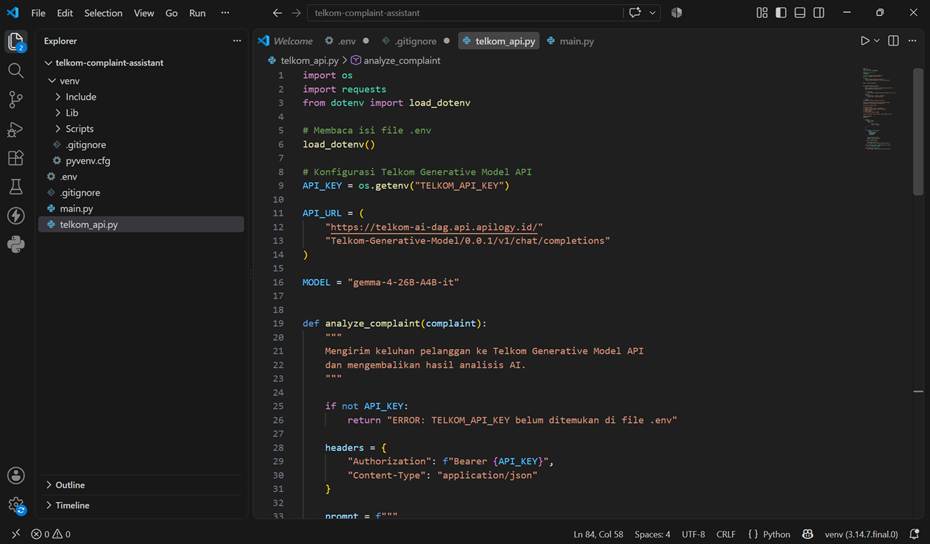
The telkom_api.py implementation in VS Code.
Testing from the terminal
main.py is kept simple: ask the user to type a complaint, call analyze_complaint(), then display the result.
| from telkom_api import analyze_complaint complaint = input(“Keluhan pelanggan: “).strip() if complaint: print(“\nMenganalisis keluhan…\n”) print(analyze_complaint(complaint)) |
CLI test succeeded. The complaint is sent from Python and the AI response appears in the terminal.
5. Building the web version with Flask
Once the terminal version worked, I moved on to the web. The reason is simple: a use case like this is much nicer to demo when users can just paste a complaint into a textarea and press one button.
| python -m pip install flask |
The project structure then becomes:
| telkom-complaint-assistant/ ├── templates/ │ └── index.html ├── static/ │ └── style.css ├── venv/ ├── .env ├── .gitignore ├── app.py ├── main.py └── telkom_api.py |
Flask backend
| from flask import Flask, render_template, request from telkom_api import analyze_complaint app = Flask(__name__) @app.route(“/”, methods=[“GET”, “POST”]) def index(): result = None complaint = “” if request.method == “POST”: complaint = request.form.get(“complaint”, “”).strip() if complaint: result = analyze_complaint(complaint) return render_template( “index.html”, result=result, complaint=complaint ) if __name__ == “__main__”: app.run(debug=True) |
Run Flask with:
| python app.py # open in your browser: http://127.0.0.1:5000 |
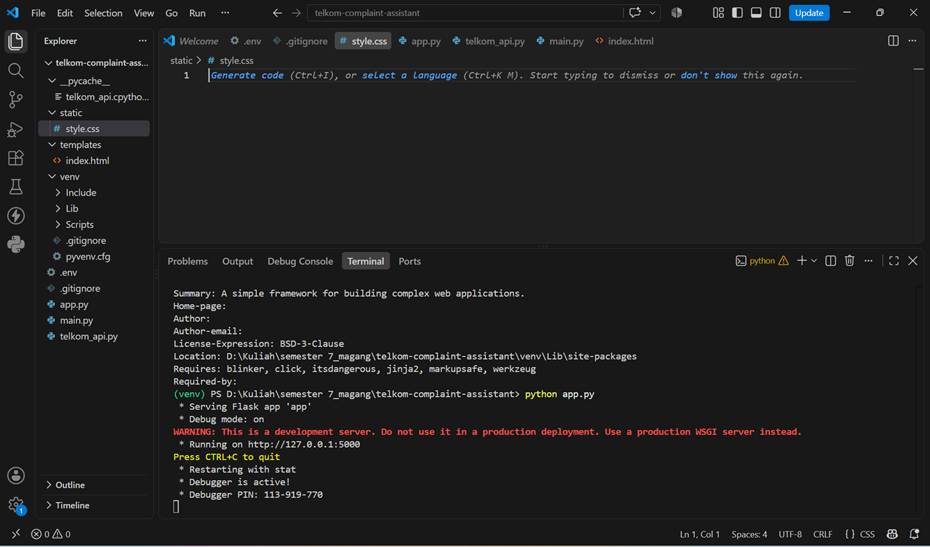
Flask running on localhost.
After adding some simple CSS, the input page looks like this:

The AI Customer Complaint Assistant form.
6. The part that makes the result much tidier: using JSON
The first version did work, but one thing bothered me: the model returned Markdown. On the web page, the ** markers were still visible, like **Kategori Keluhan** (Complaint Category). For a demo, that doesn’t look good.
The solution was not to clean up the Markdown piece by piece, but to change the output contract. I asked the model to return JSON.
| { “kategori”: “kategori keluhan”, “sentimen”: “Positif, Netral, atau Negatif”, “urgensi”: “Rendah, Sedang, atau Tinggi”, “ringkasan”: “ringkasan masalah”, “saran”: “saran tindakan”, “balasan”: “draft balasan pelanggan” } |
The response is then read with json.loads(). Because each piece of information has its own field, the frontend can display it in separate cards.
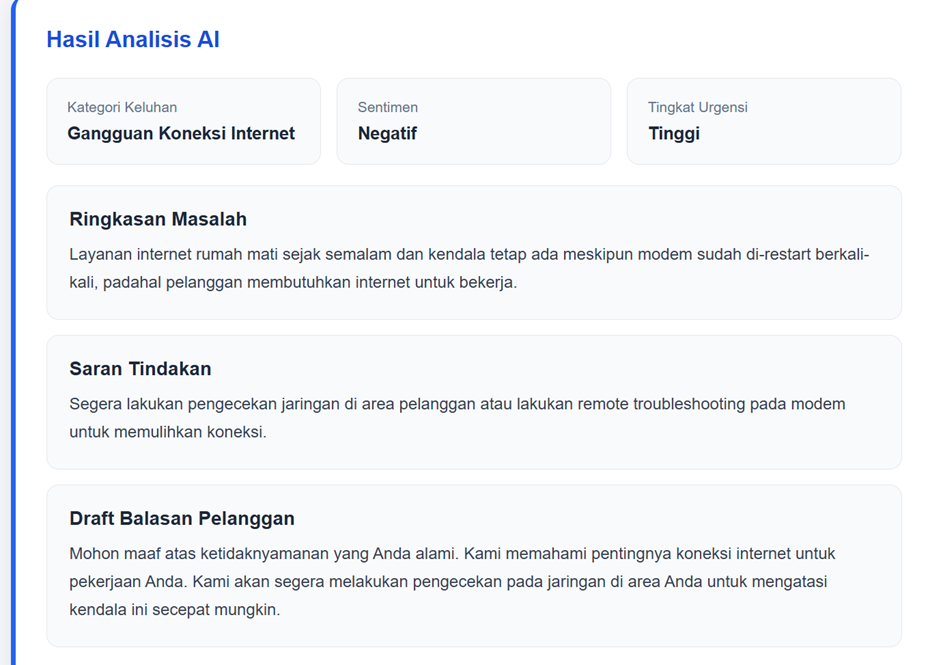
The result after structuring the output: easier to read and ready for the frontend to use.
| A small lesson from this If AI output is going to be used by an application, try to make the model return structured data. Free text is easy for humans to read, but JSON is far easier for programs to process. |
7. How did it do on the three types of complaints?
Case 1 — Internet down
Complaint: the internet has been down since last night, the modem has been restarted repeatedly, and the customer needs the internet for work.
| Field | Result |
| Category | Internet Connection Outage |
| Sentiment | Negative |
| Urgency | High |

Result of the internet connection outage scenario.
Case 2 — Payment made, status unchanged
In this scenario the system successfully distinguished a billing problem from a network outage. The category changed to Payment Issue and the urgency to Medium.

Result of the payment issue scenario.
Case 3 — Internet problem and disappointing CS service
This scenario is slightly more complicated because one complaint contains two contexts. The model chose Internet Service Disruption as the main category, but its summary and recommended action still captured the customer service problem.

Result of the internet outage scenario that also involves a customer service experience.
Quick recap
| No | Scenario | Category | Sentiment | Urgency |
| 1 | Internet down | Internet Connection Outage | Negative | High |
| 2 | Payment | Payment Issue | Negative | Medium |
| 3 | Outage + CS | Internet Service Disruption | Negative | High |
8. What did I get out of this experiment?
For a proof of concept, the results are fairly convincing. A single text input can immediately become information that is more ready for an agent to read. But it is precisely at this stage that the limitations show up too.
- Category names are still generative. In a real system, it’s better to use a fixed list of categories.
- Urgency is still the model’s interpretation. It would be safer to combine it with SLAs and business rules.
- The draft reply should stay a draft — not be sent directly to the customer.
- Customer data must be handled carefully. Don’t send credentials or sensitive information without a clear policy.
- JSON still needs to be validated because generative models occasionally stray from the requested format.
| If you want to take this use case further The most sensible next steps are adding a database/ticketing system, a controlled list of categories, human approval, and evaluation on a larger dataset of complaints. |
9. Errors I ran into
PowerShell: running scripts is disabled
The solution I used:
| Set-ExecutionPolicy -Scope Process -ExecutionPolicy Bypass |
400 Bad Request — Invalid JSON payload
This appeared when I pasted a long prompt into JSON but the string format was invalid. The safest way in Python is to use json=payload in requests.post(), rather than building the JSON as a manual string.
401/403 or token problems
- Check whether the subscription is still active.
- Make sure the token hasn’t been revoked.
- Don’t write Bearer twice: if the code already adds ‘Bearer ‘, the .env file should contain only the token.
- Regenerate the token if it has ever been exposed.
10. Further reading relevant to this use case
After the project was done, I looked for a few articles/journals covering similar areas. I used these references as support, not as a project template.
Roumeliotis, Tselikas, & Nasiopoulos (2025)
Discusses the use of reasoning LLMs for consumer complaint detection and classification.
https://doi.org/10.3390/electronics14061070
Sierra, Huanca, Torres, & Núñez (2025)
Discusses LLM-based complaint management for classifying, prioritizing, and resolving complaints.
https://doi.org/10.1016/j.array.2025.100570
Ferraro et al. (2024)
Discusses the opportunities and risks of Generative AI in customer service.
https://doi.org/10.1016/j.bushor.2024.04.013
Wan (2024)
Compares complaint responses produced by Generative AI with human responses.
https://doi.org/10.3390/informatics11030066
Closing
This project started as a simple experiment in the Trial Console, then grew into a Python function and a Flask web app. The part whose benefit I felt most was not ‘AI can answer’, but how the AI’s output is made structured enough for an application to use.
With a single complaint, the system can help surface the important context in a matter of seconds. For demos and learning the API, this use case is already interesting enough. For real-world use, it will of course still need business rules, validation, data protection, more serious evaluation, and human approval.
| The bottom line The Telkom Generative Model API can be used for more than just a chatbot. With the right prompt and output format, the model can serve as an analysis component inside an application workflow. |
Appendix — dependencies used
| requests python-dotenv flask |