

Servers have limited capacity. Rate limiting prevents one overloaded client from harming all other users.
Introduction
Imagine an API comfortably handling 100 requests per second. One day, a client writes a faulty script and sends 5,000 requests per second. The server becomes overwhelmed, responses slow down, and other users are affected even though they did nothing wrong.
That is why almost all public APIs implement rate limiting: rules that restrict how many requests a client may send within a given period. This article explains rate limiting and throttling, the algorithms behind them, their benefits, real-world examples, and their impact on developers, both when using an API and when building one.
Rate Limiting and Throttling
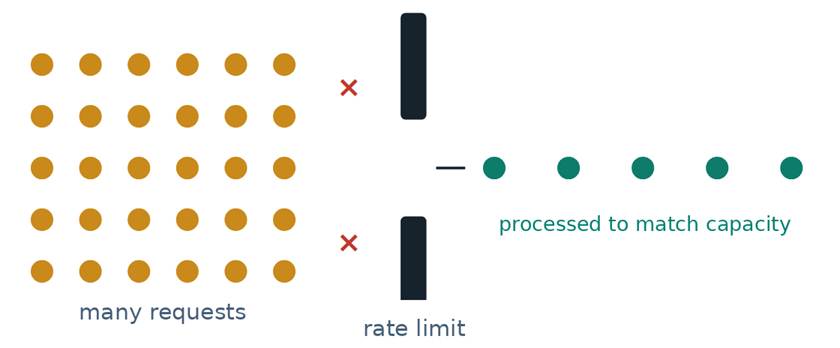
The two terms are closely related and are often used interchangeably. Conceptually, however, they behave differently when the limit is exceeded.
Rate Limiting
Sets a limit on the number of requests within a given period, for example 100 requests per minute per API key.
When the limit is exceeded, the request is rejected with 429 Too Many Requests.
Throttling
Slows down or delays requests so that the incoming rate matches the server’s capacity, for example by using a queue.
Requests are still served, but more slowly or after waiting their turn.
In practice, the two are often combined. Some platforms even use the word “throttling” for limit-based rejection, so always check the documentation of the API provider you are using.
What Does a Request Surge Look Like?
The following graph illustrates traffic from one client over 12 seconds with a limit of 100 requests per second. From seconds 5 to 7, the client spikes above the limit. The excess requests are rejected, while the rest are still processed.
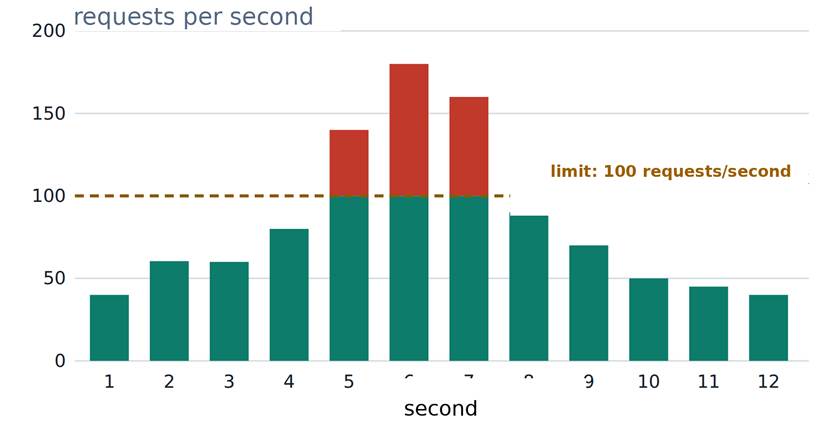
A total of 180 requests are rejected during seconds 5 to 7. The server never receives more than 100 requests per second from this client.
Commonly Used Algorithms
There are several ways to calculate and enforce limits. Each involves trade-offs among simplicity, accuracy, and the ability to absorb short bursts.
| Algorithm | How It Works | Advantages | Disadvantages |
| Fixed window | Counts requests within a fixed time window, such as one minute, then resets. | Simple and memory-efficient. | A burst at the boundary of two windows can allow almost twice the limit. |
| Sliding window | A window moves with time, counting requests in the last N seconds. | More accurate; no gap at the boundary. | Requires more storage and computation. |
| Token bucket | Tokens are replenished at a constant rate; each request takes one token. | Allows short bursts and is very common. | Requires two parameters: capacity and refill rate. |
| Leaky bucket | Requests enter a queue that “leaks” out at a constant rate. | Smooth output; suitable for throttling. | Bursts fill the queue and add latency; a full queue drops requests. |
Example: Token Bucket
A token bucket is easiest to imagine as a bucket. The bucket stores tokens, and each request must spend one token.
-
- The bucket has a capacity. For example, a maximum of 100 tokens. This determines the largest burst that can still be allowed.
-
- Tokens are replenished at a constant rate, for example 10 tokens per second, until the bucket is full.
-
- A request takes one token. Every incoming request checks the bucket’s contents.
-
- If a token is available, the request is processed. The number of tokens decreases by one.
-
- When the tokens are exhausted, the request is rejected. The server returns 429, or holds the request until a token becomes available when throttling is used.
What Does the Response Look Like?
When the limit is exceeded, a well-designed server does not simply close the connection. It responds with status 429 Too Many Requests and tells the client when it may try again through the Retry-After header.
|
HTTP/1.1 429 Too Many Requests { “error”: “rate_limit_exceeded”, |
The Retry-After header is part of the HTTP standard. X-RateLimit-* headers are conventions that vary between providers, so check the name and meaning in the documentation for the API you are using.
Example Server-Side Configuration (Nginx)
|
# 10 requests per second for each IP address location /api/ { |
Makes brute-force attacks, credential stuffing, aggressive scraping, and some denial-of-service attacks more difficult.
The load stays within capacity, so response times and availability do not collapse during spikes.
One client cannot consume all shared resources. Every user gets a reasonable share.
Unexpected traffic does not immediately turn into rapidly increasing bills for servers, databases, or third-party services.
Different limits for each plan (free, standard, enterprise) make it easier for providers to set pricing and quotas.
With clear limits, teams can estimate the maximum load and determine when additional infrastructure is needed.
| Use Cases Login Page Problem An attacker tries millions of password combinations against a single account. Limit For example, 5 failed attempts per 15 minutes for each account and IP address. Result The attack becomes too slow to be worthwhile. |
| Public API with Tiered Plans Problem Anonymous and registered users have different needs. Limit As an example, the GitHub REST API limits users to 60 requests per hour without authentication and 5,000 per hour with authentication. These figures can change; check the latest documentation. Result Encourages users to register while preserving capacity for everyone. |
| Flash Sales and Ticket Sales Problem Thousands of people press the purchase button at the same moment, and the checkout database cannot cope. Limit A virtual queue that releases users to the checkout page at a steady rate (throttling). Result Users wait their turn instead of seeing an error page. |
| Script That Continuously Fetches Data Problem A client calls the API 500 times per second, whether because of a scraper or a bug in a loop. Limit Set limits per API key and per endpoint, with stricter limits for expensive endpoints. Result Other clients continue to be served normally. |
Impact on Developers
Rate limiting changes how you design applications, both when you use someone else’s API and when you provide your own.
-
- Read the limits before designing. Limits per minute, per day, and per endpoint affect the architecture from the start.
-
- Handle 429 correctly. Do not crash and do not retry without a delay. Respect Retry-After.
-
- Use exponential backoff with jitter. The delay increases with each attempt and includes randomness so many clients do not retry at the same time.
-
- Reduce the number of requests. Use caching, batch endpoints, and webhooks instead of polling.
-
- Monitor the remaining quota. Read the remaining-quota headers, then slow yourself down before reaching the limit.
-
- Set limits based on real data. Measure normal usage and perform load testing before choosing the numbers.
-
- Limit according to the right identity. Use the API key, user, or endpoint. Relying only on IP can be misleading because many users may share one IP address.
-
- Provide clear information. Include Retry-After, remaining-quota headers, and actionable error messages.
-
- Use fast counter storage. On many servers, shared counters such as Redis keep limits consistent.
-
- Provide an upgrade path. Offer higher-tier plans or limit-increase requests for legitimate users.
Example of Handling 429 on the Client Side (Python)
|
import time, random, requests def get_with_retry(url, max_retry=5): # Prefer Retry-After (assumed to be in seconds); raise RuntimeError(“Request limit reached, try again later”) |
There are costs as well. Rate limiting adds complexity, a small amount of latency for checking limits, and the risk of rejecting legitimate users when limits are too strict. A good limit is rarely noticeable to normal users but firm against abuse.
APIs need to limit the number of requests because server capacity is limited and not all clients behave well. Rate limiting rejects excess requests, while throttling slows them down or queues them. Both help maintain stability, fairness, security, and cost control.
For developers, these limits are part of the API contract. API users need to handle 429 with intelligent delays and reduce unnecessary requests. API providers need to choose limits based on data, explain them clearly, and provide a path for legitimate users.